Open source · Apache-2.0
A QA team made of agents
Bugpatrol uses your app the way a tester does. It finds bugs, fixes them, checks each fix in the running app, and opens the pull requests and issues for your team.
WEB · ELECTRON · iOS · ANDROID
What it is
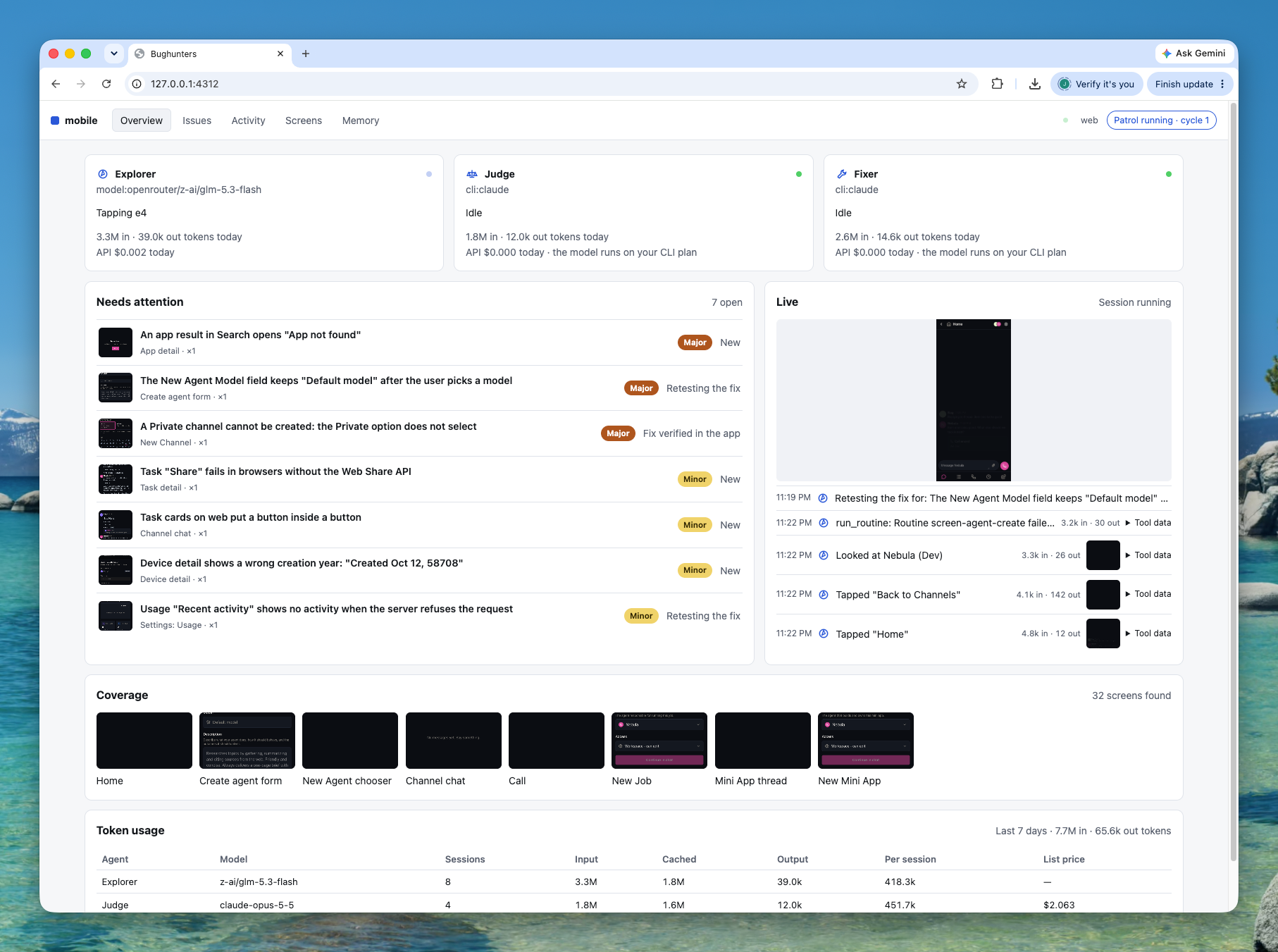
Three agents that test like your QA team
Bugpatrol runs on your machine and works on web, desktop, and mobile apps. The Nebula team uses it every day to test our own apps, and we made it open source so that all teams can use it.
LLM agent
Explorer
Runs your app, maps its screens, and reports what looks wrong. It sees each screen, the console errors, and the failed requests.
LLM agent
Judge
Decides which reports are real bugs, writes the issues, and checks each fix. Give it your strongest model.
LLM agent
Fixer
Writes a fix in its own git worktree, with the agent CLI you already use: Claude Code, Codex, Kimi CLI, or pi.
How it works
One patrol, again and again
npx bugpatrol pulls main, starts your app, and runs the full cycle. Then it waits for a new commit and runs it again.
- 1
Explore
The explorer uses the app and files bug reports.
- 2
Judge
The judge keeps the real bugs and writes the issues.
- 3
Fix
The fixer writes a fix for the worst issues.
- 4
Retest
The explorer and the judge check each fix in the running app.
- 5
Publish
A PR for each fix, and an issue for each major bug with no fix.
- Every 30 minutes, the patrol pulls the latest main. It explores and judges only when main has new commits, so a patrol that runs all day costs little when nobody merges.
- On the same commit it still finishes the open work: fixes, retests, publish, CI checks, and the GitHub sync. A fix never waits for the next merge.
- Close any issue or PR it opened, and the patrol learns from it. It does not open it again.
- The fixer and GitHub stay off until you turn them on. PRs are drafts by default.
Get started
Set it up in two minutes
Let your coding agent set it up, or run init yourself. Bugpatrol needs two things from you: a command that launches your app, and a way to sign in.
1. Install the Bugpatrol skill in your repo
It works with Claude Code, Codex, Cursor, and many other agents. Commit the skill and skills-lock.json, so your team gets it too.
$ npx skills add agent-labs-dev/bugpatrol2. Ask your agent
The skill tells the agent how to configure Bugpatrol for your app, how to run it, and how to show you the results.
Set up Bugpatrol for this repo.
Full getting started guide, with Electron and mobile examples →
What is supported
Works with your app and your models
Each agent can use a different LLM. Give the judge your strongest model, and the explorer a fast, low-cost one.
- Platforms
- Web (Playwright), Electron (CDP), iOS simulator and Android emulator (Maestro)
- Login
- Any auth system: your own setup commands plus plain-English instructions
- Agent LLMs
- Claude Code, Codex, Kimi CLI, pi, or any CLI agent. Or an API key for OpenRouter, Vercel AI Gateway, OpenAI, Anthropic, or a custom endpoint
- GitHub
- PRs, issues, and state sync through the gh CLI
- Output
- A local dashboard, GitHub PRs and issues, and JSON files under .bugpatrol/runs/
Put your app on patrol
Bugpatrol is free and open source under Apache-2.0. Star it, read the code, and open an issue.